Why Jira's Native Clone Doesn't Copy Sub-tasks (and How to Fix It)
Jira clone subtasks not working? See why native clone stops one level short on epics, three workarounds, and the one-click fix for the full tree. Compare.
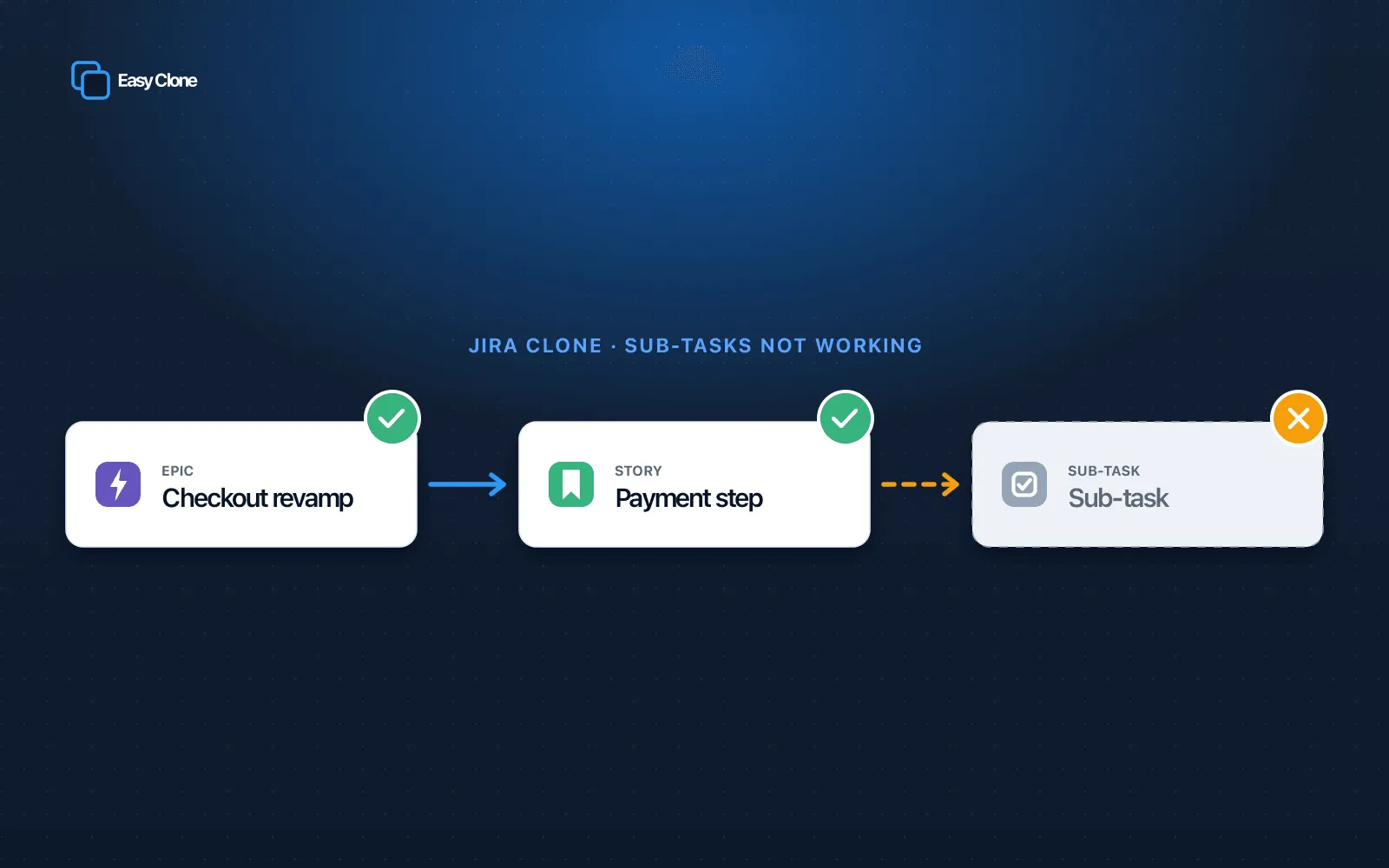
You hit Clone, and the sub-tasks are gone
You clicked Clone on an epic. The new epic appeared. The sub-tasks didn’t. Maybe the stories came across and maybe they did not, but the sub-tasks underneath them did not. Or you cloned a story into another project and its sub-tasks never made the trip. If that is the symptom you are chasing, the phrase you probably typed was “Jira clone subtasks not working,” and you are not doing anything wrong. Native clone behaves like this by design in several common setups. This article shows you how to reproduce it, why it happens, three native workarounds, and a one-click fix.
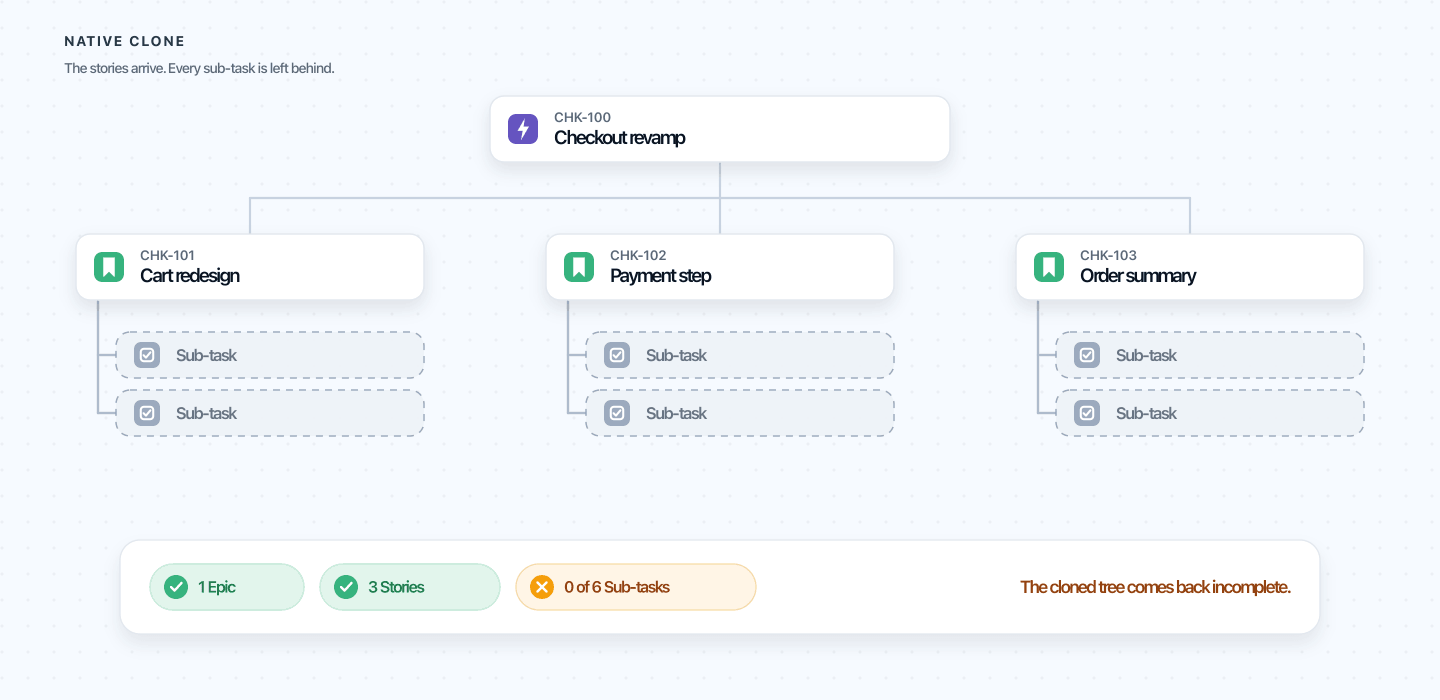 After cloning an epic, the stories may appear but the sub-tasks beneath them do not.
Reproduce the bug: Jira clone subtasks not working
Before you fix it, reproduce it, so you know which configuration is affected. The steps below match the Jira Cloud issue view as of May 2026. Teams report jira clone sub-tasks not working in two situations: cloning an epic, and cloning across projects. Start with the case that works, so the failure is obvious.
Cloning a story with its sub-tasks (this one usually works)
- Open a story that has two or three sub-tasks.
- Select the more actions menu, the ••• icon at the top right of the issue.
- Choose Clone.
- In the Clone dialog, leave the Clone sub-tasks option checked.
- Select Create.
The clone lands in the same project with its sub-tasks attached. A story and its sub-tasks are one level apart, and one level is what native clone handles. This is the narrow happy path, and it is why people assume clone always copies sub-tasks.
Cloning an epic (the sub-tasks disappear)
- Open an epic that contains several stories, each with its own sub-tasks.
- Open the ••• menu and choose Clone.
- Enable the option to include child work items if your Jira offers it, then select Create.
Native clone copies one level of children, so the stories come across but the sub-tasks beneath each story do not. The cloned epic looks populated until you open a story and find it empty. This is jira clone missing subtasks in its most common form. Leave the child-items option off, and you get the epic on its own.
Cloning across projects (the silent drop)
Native clone has no project picker, so the usual move is to clone in place, then Move the copy to another project. If that project uses a different issue-type scheme, the sub-tasks have nowhere to land and are dropped without an error.
Which configurations fail silently, and which throw an error? Epic clones and cross-project moves usually fail silently, leaving you with less than you started with. You hit a hard error mainly when a sub-task has a required field with no default in the target, or when you lack create permission for the sub-task type. Team-managed and company-managed projects differ here, so test the project type your team uses.
Why Jira’s native clone leaves sub-tasks behind
The short version: native clone copies one level of hierarchy, and the sub-tasks you want usually sit a level below that line.
You work with three levels: an epic, stories and tasks under it, and sub-tasks under those. Clone reaches one step down from whatever you selected. Clone a story and it recreates that story’s sub-tasks, one level below, which is why the Clone sub-tasks option appears. Clone an epic and it reaches the stories, but the sub-tasks beneath them are a second level, and clone does not go there.
The data model decides where that line sits. A sub-task cannot exist on its own; it is bound to one parent, so it travels with that parent. An epic-to-story link is looser: since the unified parent field replaced the old Epic Link, a story points at its epic but remains an independent issue. Clone copies the object you selected plus its direct children, not the whole tree, so when you clone an epic the stories may come but every sub-task under them stays behind. This is why jira clone subtasks not working shows up the moment you clone an epic rather than a single story.
Cross-project copies fail for a related reason. The dialog cannot target another project, so you clone and then Move, which runs the copy through the destination’s issue-type scheme, fields, and workflow. If the sub-task type is not enabled there, the sub-tasks have nowhere to land, custom fields not on the target screen are dropped, and the status resets. Comments and work logs are not carried at any level.
None of this is a bug you can file. It is native clone doing what it was built to do, so a reliable fix has to come from outside it.
Three workarounds using only native Jira
If you have already concluded native clone cannot do this, you can jump to a dedicated Jira native clone alternative. If you would rather exhaust the built-in options first, here are the three that work, and the point at which each one falls apart.
Workaround 1: Clone the parent, then rebuild every sub-task by hand
- Clone the story or epic as shown above.
- Open the clone.
- For an epic, recreate any missing stories, then open each story and add its sub-tasks one at a time with the Create subtask action (shown as Add a child issue in some projects).
- Re-enter the field values, re-attach the files, and re-link anything that mattered.
This works for a handful of sub-tasks you only clone once. It breaks the moment the tree is large or the job is repeatable: you retype summaries, descriptions, estimates, and custom fields, without the attachments or comments that gave them context. On a forty-issue epic, that is most of an afternoon.
Workaround 2: Clone issue by issue, then bulk re-parent
Native Jira has no bulk clone. The bulk-change menu covers Edit, Move, Transition, and Delete, and none of those duplicates an issue. So the realistic version is to clone each parent individually, then select the results with a JQL filter and use Bulk change to re-home or re-parent them. Jira Automation hits the same wall: a rule can clone an epic’s stories, but with no nested branches it cannot reach the sub-tasks beneath them.
This works if the clones already exist and you only need to fix their parent or project. It breaks because the cloning is still one issue at a time, so “bulk” never applies to the step that hurts. If cloning many issues at once is the goal, native Jira cannot do it. Our walkthroughs on cloning multiple issues in Jira Cloud and bulk cloning from a JQL search cover that case.
Workaround 3: Export to CSV and re-import
- Build a JQL filter that returns the whole tree, parents and sub-tasks together.
- Export the results to CSV.
- In the file, clear the issue keys, add a column that maps each sub-task to its parent, and adjust any fields that differ in the target project.
- Import with System settings, then External System Import, then CSV, mapping each column and the sub-task parent linkage.
This works for a one-time migration if you are comfortable with CSV mapping and hold the admin import permission. It breaks on everything that is not plain text: attachments and comments do not travel in a CSV, the parent linkage is fiddly, and field mapping errors are common. It is a migration tool, not a cloning tool.
The one-click fix: clone the whole tree at once
The durable answer to jira clone subtasks not working is a clone that copies the whole tree, not one level of it. Easy Clone for Jira Cloud does exactly that in one action, however deep it runs. Point it at an epic and it copies the epic, every story under it, and every sub-task under those, with attachments, comments, issue links, and field values carried across. Nothing is rebuilt by hand, nothing silently left behind.
It also handles what native clone cannot reach: clone into a different project with cross-project field mapping so values land in the right fields, select issues with JQL and clone in bulk, and re-parent cloned sub-tasks automatically. Easy Clone is Cloud Fortified, GDPR-compliant, and EU-hosted, takes part in the Atlassian Bug Bounty, and runs for more than 1,000 teams at a 4.9-star rating. Other apps exist too, including Deep Clone, Elements Copy & Sync, and Clone Plus, so the honest test is to compare them on your own issues.
| Capability | Jira native clone | Easy Clone |
|---|---|---|
| Clone a single issue | Yes | Yes |
| Clone a story with its sub-tasks, same project | Yes, one level down | Yes |
| Clone an epic’s direct child stories | Yes, with the child-items option | Yes |
| Clone an epic down to every sub-task | No, clone stops after one level | Yes, the full tree |
| Clone sub-tasks into another project | No, same-project only | Yes, with project and issue-type remap |
| Carry attachments | Optional, one level only | Yes, across the tree |
| Carry comments | No | Yes, optional |
| Carry issue links | Optional, one level only | Yes, across the tree |
| Keep field values across projects | Partial, some reset | Yes, with field mapping |
| Bulk clone from a JQL search | No | Yes |
| Re-parent cloned sub-tasks | Manual | Automatic |
| Find and replace field text on clone | No | Yes |
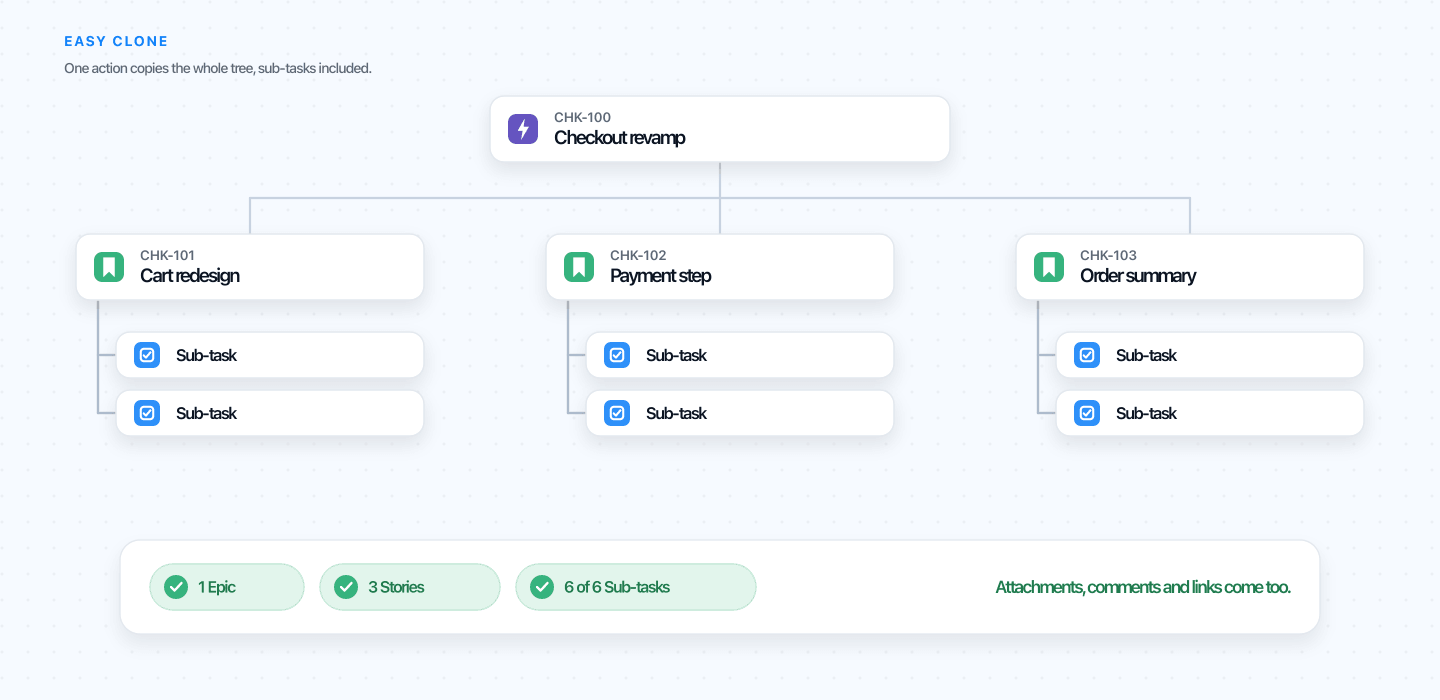 One action copies the epic, its stories, and every sub-task, with attachments and links intact.
You can try the live demo on real issues without installing anything. Clone an epic, watch the whole tree come across, and decide for yourself. For the full side-by-side, the native clone vs Easy Clone page lays out every difference in one place.
FAQ: Jira clone and sub-tasks
Does Jira’s native clone copy attachments?
Yes, but only on the issue you clone, and only if you check the option. Native clone can carry attachments and links one level down, yet it does not reach the sub-tasks beneath a story, and it does not copy comments or replicate status at all. If you need attachments and comments preserved across a whole epic, native clone will not get you there.
Why doesn’t Jira clone copy subtasks?
Because native clone copies only one level of hierarchy. Cloning a story reaches its sub-tasks, one level down, but cloning an epic reaches only the stories. The sub-tasks beneath those stories sit a second level down, and the clone stops before it gets to them, so they are left behind.
Can I clone a single sub-task on its own?
You can clone a sub-task, but the copy stays under the same parent, and you cannot promote it to a standalone issue during the clone. If you need the sub-task somewhere else, you clone it, then convert or move it afterward, which resets some fields. A dedicated clone tool lets you re-target and re-parent in the same step.
Why does my clone lose the parent link?
A cloned issue keeps its own field values, but the parent relationship is not always carried, particularly after a Move between projects. When the destination uses a different issue-type scheme, the parent or sub-task type may not exist there, so Jira drops the link. Re-parenting by hand or with bulk change is the native fix.
Can I clone Jira issues across projects?
Not in one step. The native clone dialog has no project picker, so it always copies into the same project. To get the copy elsewhere you clone, then Move, and the Move runs the issue through the target project’s schemes, which is where sub-tasks and field values tend to break. Cloning straight into another project needs an app.
Does cloning an epic copy its stories and sub-tasks?
It copies the stories one level down, but not the sub-tasks beneath them, so the tree comes back incomplete. To copy the whole structure natively you rebuild the missing sub-tasks by hand or export and re-import via CSV. If you need this often, see our guide to cloning a Jira epic with all its sub-tasks, or clone the full tree in one action with Easy Clone.
Fix it on your own issues
The fastest way to know whether this solves your problem is to watch it on a real epic. Try the live demo, clone a multi-level structure, and confirm every sub-task, attachment, and link comes across. When you are ready, install Easy Clone free for up to 10 users, with paid plans from $0.40 per user each month, scaling down from there. No more rebuilding sub-tasks by hand.
Found this helpful? Share it.
Ready to clone smarter?
Install Easy Clone from the Atlassian Marketplace. Free trial, no credit card.