Comparison

Native Jira clone vs Easy Clone

Jira's native clone has come a long way: you can now toggle attachments, issue links and direct child work items. The remaining gaps - recursion deeper than one level, comments, cross-project schema mapping, and bulk from JQL - are where Easy Clone takes over.

Native Jira clone gets you a copy.
Easy Clone gets you the whole tree.

  • Sub-tasks and child issues come along for the ride.
  • Attachments, comments and links are preserved, not dropped.
  • Cross-project cloning with guided field, type and component mapping.
  • Bulk clone from JQL: an entire result set in one background job.

Feature comparison

What native Jira clone copies vs what Easy Clone copies.

Capability
Native Jira clone
Easy Clone
Single-issue clone
Yes
Yes
Attachments
Optional toggle
Optional toggle, across the whole tree
Issue links (Relates to…)
Optional toggle
Optional, preserved across the tree
Direct child work items
Optional toggle (one level)
Yes
Sub-tasks of those children
Not cloned (depth = 1)
Recursive, no depth limit
Comments & work logs
Not cloned
Optional, with mention & impersonation controls
Source status
Resets to workflow default
Optional: replicate or start fresh
Across different projects
Schema must match; fields drop silently
Guided mapping for issue types, components & field values
Custom-field value mapping
Mismatched dropdown/multi-select values lost
Pick a target value for each option
Bulk from JQL
Not supported
Entire result set in one background job
Cancellable progress
Synchronous, no progress UI
Real-time tree, cancel any time
Security tier
Atlassian standard
Cloud Fortified by Atlassian

Where native clone fails

The three problems that brought you here.

"I cloned an Epic and the sub-tasks are missing."

Native Jira

Native clone goes one level deep. With "Clone child work items" on, it copies the Stories under your Epic, but their sub-tasks stay behind.

With Easy Clone

Easy Clone walks the tree recursively. Epic, Stories, Sub-tasks, and any grandchildren are all duplicated in a single background job.
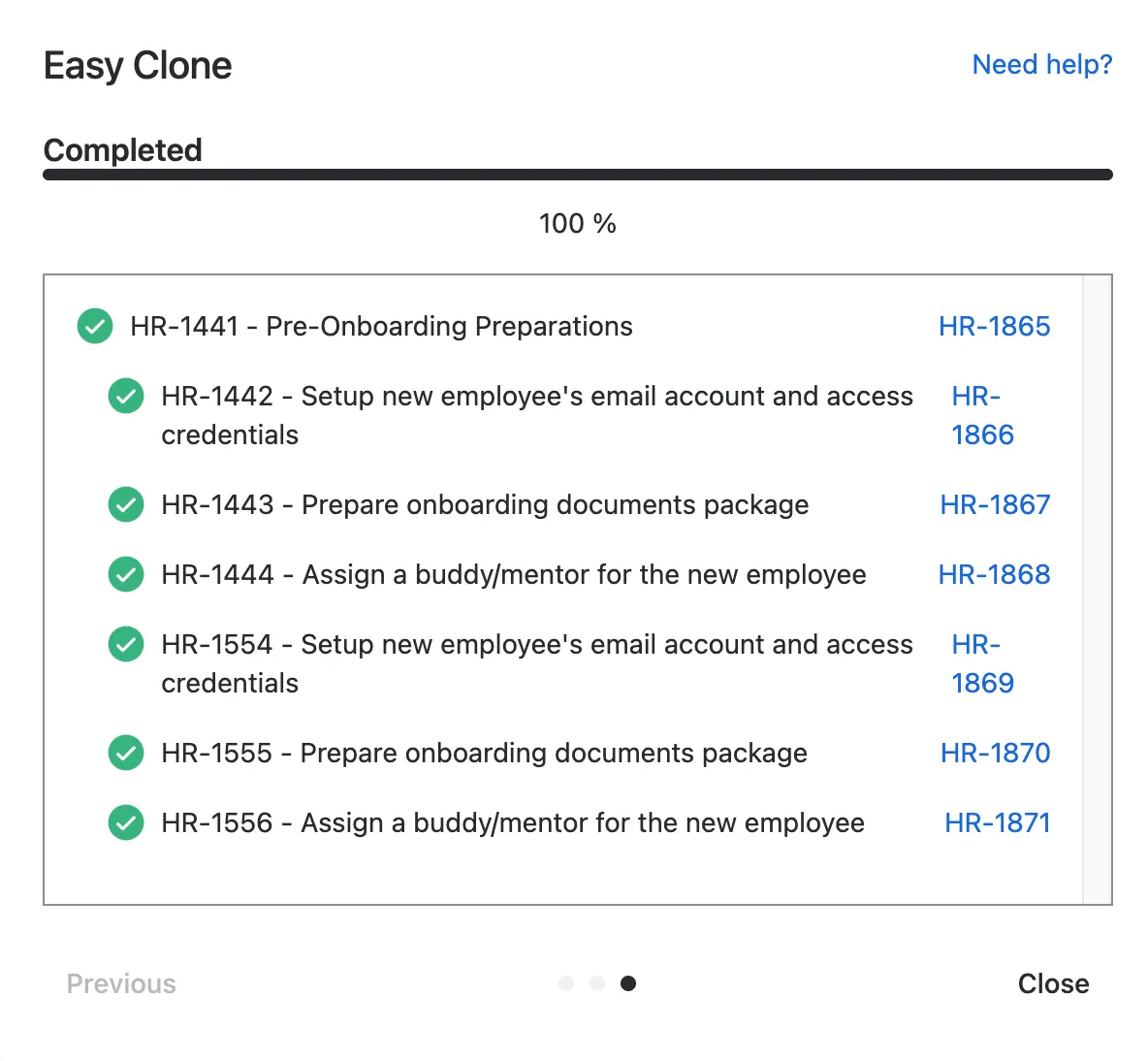
Easy Clone completion screen showing every level of the hierarchy cloned

"My cloned ticket has no comments and a brand new status."

Native Jira

Native clone does not copy comments or work logs, and the new issue always starts at the workflow default status, not the source's current state.

With Easy Clone

Easy Clone lets you carry over comments (with mention and impersonation controls) and optionally replicate the source status on every cloned issue.
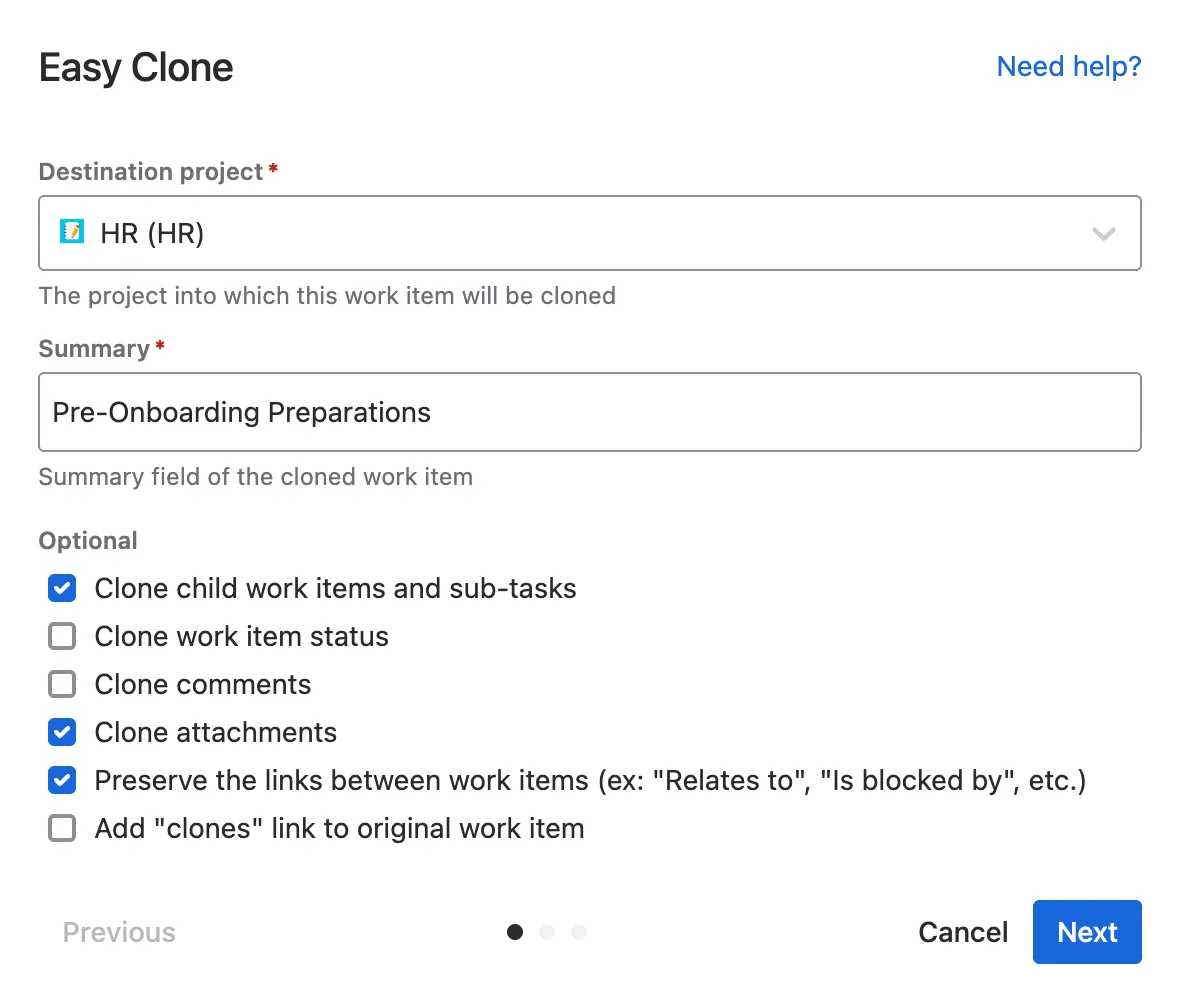
Easy Clone modal with the Clone comments and Clone status options shown

"I need to clone an Epic into a different project."

Native Jira

When the source and destination projects have different schemas - issue types, components, custom-field options - native clone either fails or silently drops the mismatches.

With Easy Clone

Easy Clone detects the differences and walks you through mapping each one before the clone runs. Nothing gets dropped without you seeing it.

Easy Clone project matching screen mapping issue types and components

FAQ

Common questions about Jira's native clone

Can Jira's native clone copy sub-tasks?

Partially. Native clone has a "Clone child work items" toggle that copies the direct children (e.g. the Stories under an Epic). What it does not do is recurse further: those Stories' sub-tasks stay behind. Easy Clone walks the full hierarchy regardless of depth.

Does Jira native clone copy attachments?

Yes, since Atlassian added a "Clone attachments" toggle to the native modal. The remaining limitation is scope: native clones a single issue, so attachments on its children are still skipped. Easy Clone re-uploads attachments across the whole cloned tree.

Does native clone copy comments?

No. Comments and work logs are not cloned by the native action. Easy Clone copies them on request, with controls for preserving mentions and impersonating the original author so threads read as expected.

Can I use Jira's clone to copy issues across projects?

Only when the source and destination share the same schema. As soon as the issue types, components or custom-field options differ, native clone either fails outright or silently drops the mismatched values. Easy Clone shows you the differences and lets you map each one before running.

Why does my cloned issue lose custom-field values?

Native clone copies fields that exist 1:1 in the destination project. Dropdown options, multi-selects and project-specific fields that differ get reset to empty. Easy Clone's field-value mapping step lets you pick a target value for every option.

Can I bulk-clone many Jira issues at once?

Not with the native Clone action - it operates on one issue at a time. From Jira's Issue Navigator, Easy Clone's Bulk Clone takes any JQL query and clones every matching issue, with their children, into the project of your choice.

Is Easy Clone safe to install alongside the native clone?

Yes. Easy Clone is a Cloud Fortified Atlassian Marketplace app, running in addition to Jira's built-in features, never replacing them. Teams typically reach for native clone for one-off copies and Easy Clone for anything with a hierarchy or cross-project move.

Free 30-day trial

Switch from native clone to Easy Clone.

Install in two clicks from the Atlassian Marketplace. Keep your sub-tasks, attachments and sanity.