How to Clone a Jira Epic with All Its Child Issues (Without Rebuilding It by Hand)
Clone a Jira epic with child issues, stories and sub-tasks in one pass, then reuse the whole plan for the next client or quarter, and see what carries.
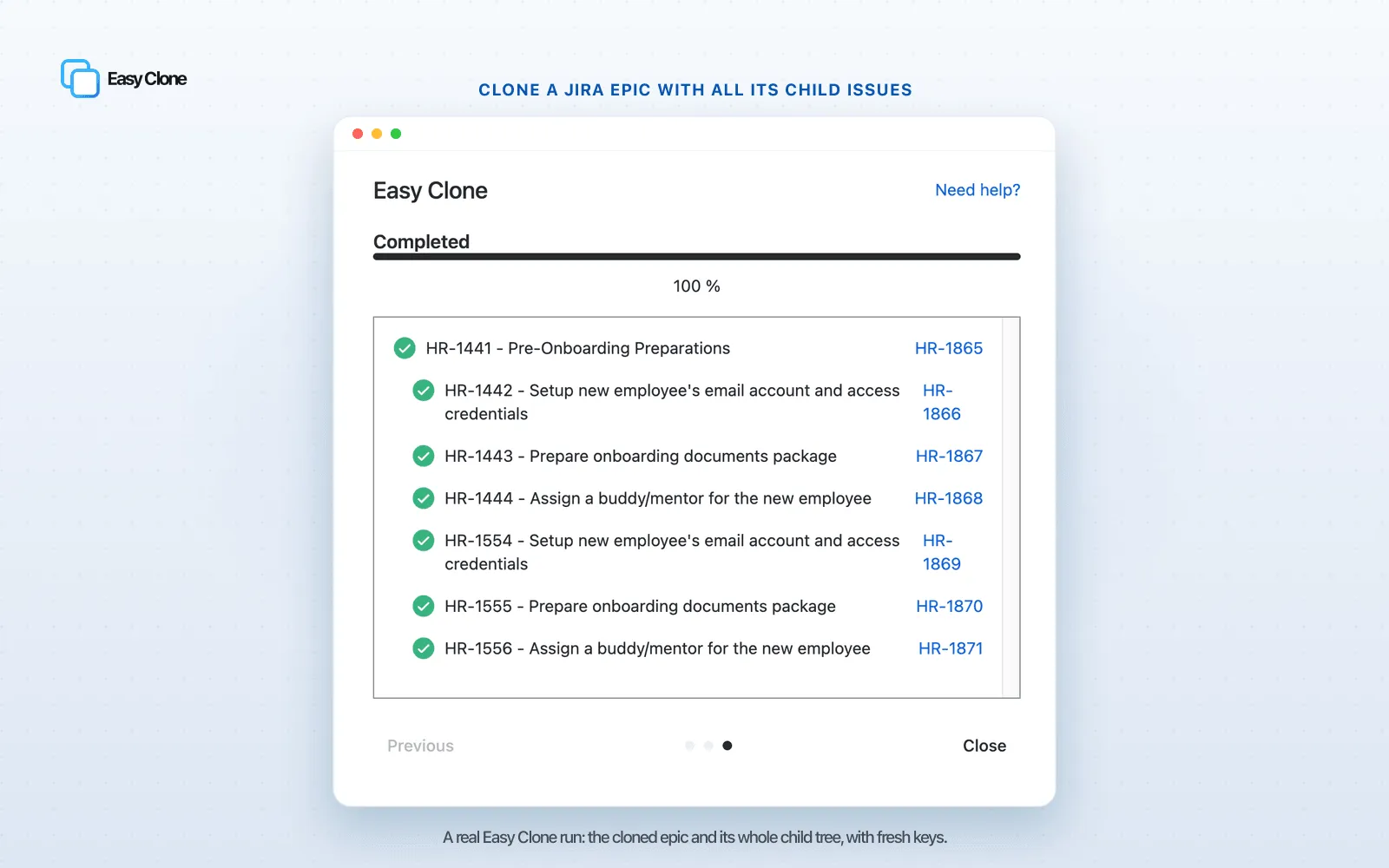
The epic you are about to clone is a plan you already trust
Most people who clone an epic are not collecting a souvenir. They are about to run the same shaped piece of work again: the next customer onboarding, the next release, the next quarterly audit, the next market launch. The epic in front of you is a plan that already works, and you want to stand it up again without retyping forty tickets. So the thing you actually need is the whole structure, the epic plus its stories plus the sub-tasks under them, landing in one move and ready to edit.
Jira’s built-in Clone will not hand you that. It copies the epic and at most the level directly beneath it, which is why a freshly cloned epic so often opens with empty stories. The mechanics of that one-level-deep rule are worth understanding once, and we cover them in why Jira’s native clone doesn’t copy sub-tasks. This guide is about the other half of the problem: once you can copy the full tree, how do you reuse an epic well. How to clone a Jira epic with child issues in a single pass, what survives the trip, how to re-stamp the copy for the new round, and how to spin up several at once.
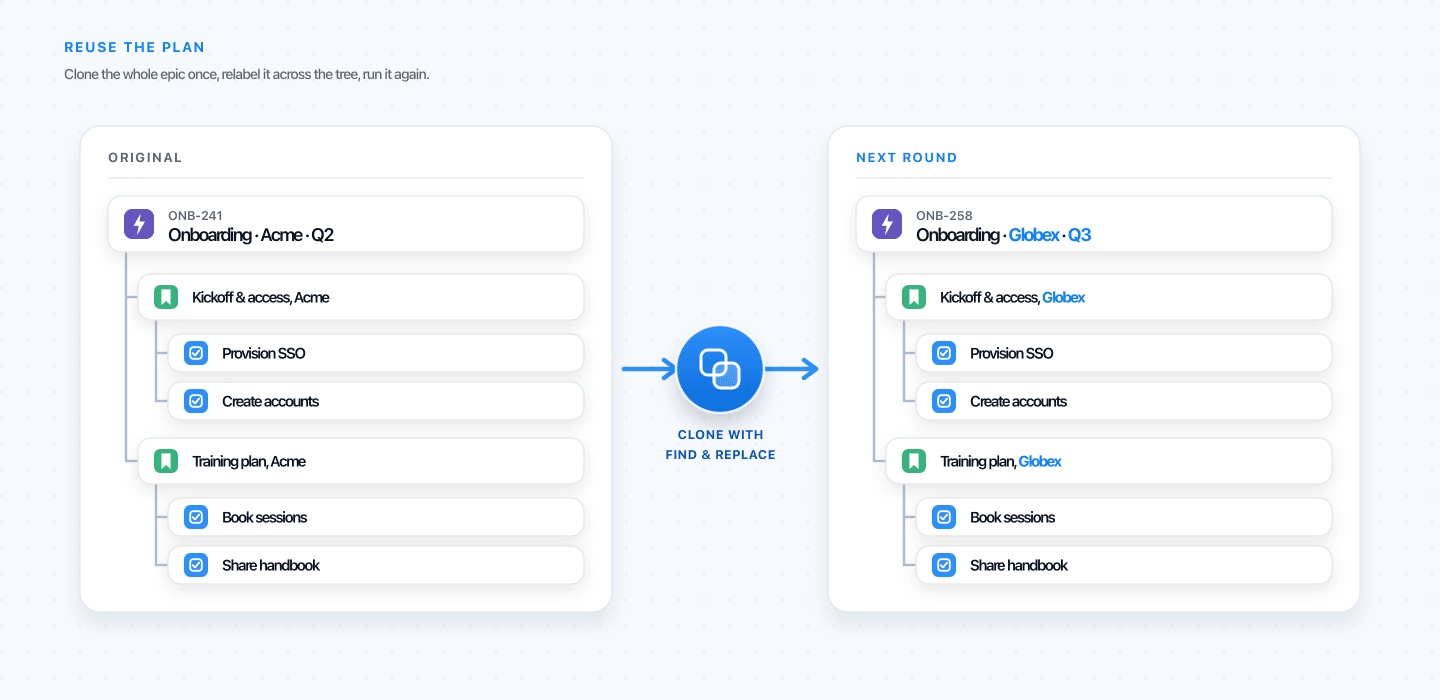 Cloned well, an epic becomes a plan you can run again, renamed for the next round and complete down to the last sub-task.
Quick answer: Native Jira clone copies an epic only one level down, so the sub-tasks under each story are left behind. To clone a Jira epic with all its child issues, run a deep clone that follows the whole hierarchy, then rename the copy as it builds so it is ready for the new round. You can see it run on one of your own epics before installing.
Why teams clone an epic in the first place
It helps to be honest about the job, because it shapes how you should clone. Cloning a single bug is a one-off. Cloning an epic is almost always about repetition. A few shapes show up again and again:
- Onboarding. One onboarding epic per new customer, the same twenty steps every time, owners and dates swapped in.
- Releases. A release-train epic you copy each cycle so nothing in the checklist is forgotten.
- Audits and compliance. The SOC 2 or ISO review that comes around every quarter with the same evidence-gathering stories underneath it.
- Launches. One launch epic per market or region, run in parallel rather than in sequence.
- New teams or services. A proven setup epic you hand to each new squad so they start from the same baseline.
In every case the epic is a reusable plan, and the cost you are trying to avoid is rebuilding its children by hand. A twenty-four issue onboarding epic, recreated story by story and sub-task by sub-task, is a morning gone and a few things forgotten. Clone it properly and that morning disappears. If your structure never changes at all, a maintained template can beat repeated cloning, and we come back to that choice at the end.
How to clone a Jira epic with child issues
Here is the full pass with Easy Clone, written for the reuse case. The screens reflect Jira Cloud as it looks in June 2026.
- Open the epic you want to reuse, from the backlog, the board, or the issue itself.
- Open the actions menu, the
•••at the top right, and pick Easy Clone. - Set the clone to follow the full hierarchy, so it takes the epic, every story and task under it, and the sub-tasks under those, rather than stopping at the first level.
- Decide what rides along: attachments, comments, issue links, and the custom fields that matter. If this copy is for a new round, set a find-and-replace here too, more on that below.
- Pick the destination project and start the clone. You can watch the tree build and stop it if something looks off, so a hundred-issue epic is not a leap of faith.
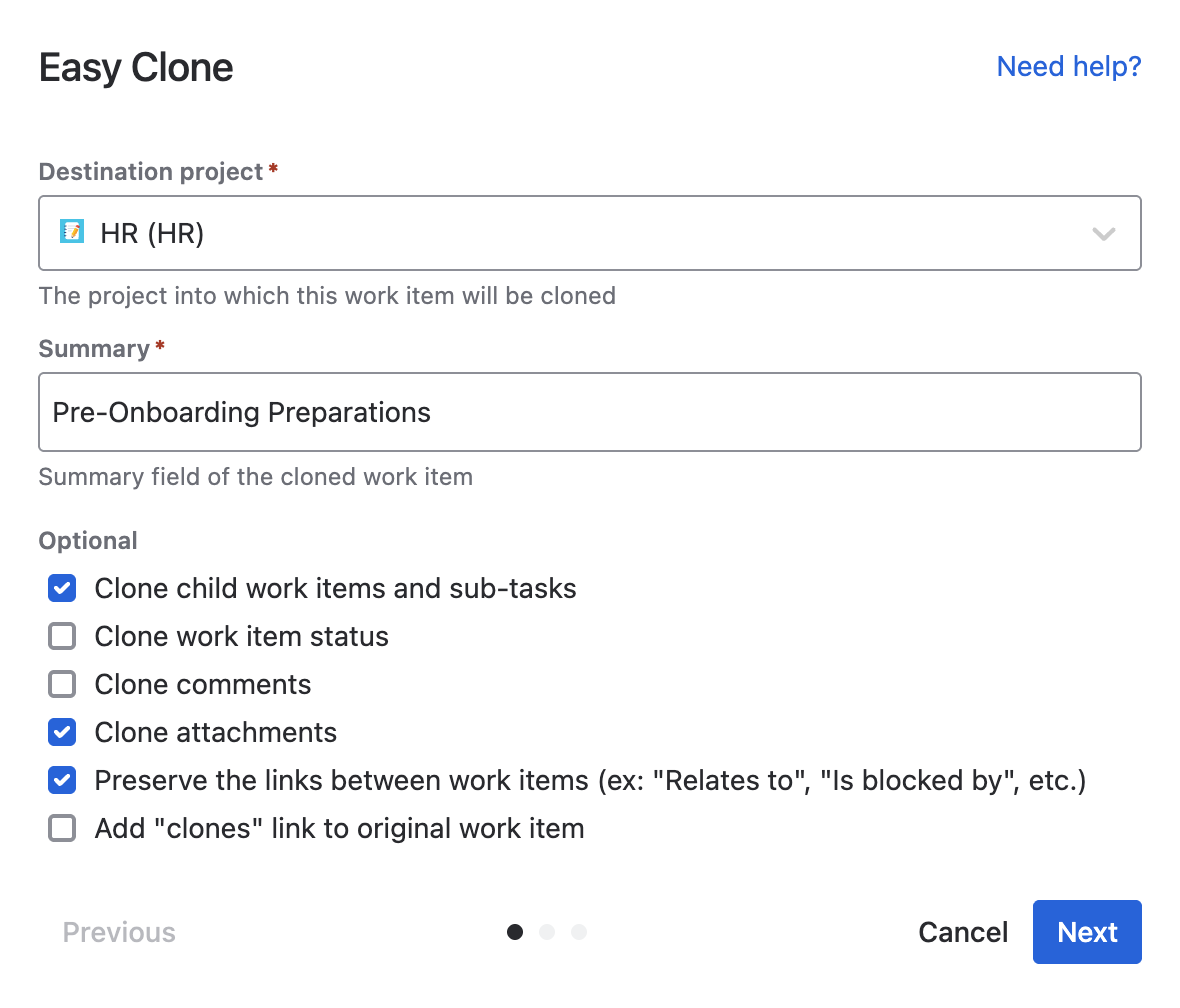 One dialog decides how deep the clone goes and what each issue carries.
That single run rebuilds the epic, its stories, and every sub-task, each re-parented to its new story rather than left loose. The deep-clone how-to and the native clone comparison cover the background; Easy Clone exposes the full set of clone options. The rest of this guide assumes you can copy the whole tree, and focuses on doing it well.
What actually carries when you clone an epic
When you clone a Jira epic with child issues, a complete copy is more than a matching set of issue titles. An epic carries its own fields and relationships, and a clone is only useful if the right ones come with it. Use this as a pre-flight check, and confirm the edge cases against your own project, because team-managed and company-managed setups behave differently.
| What is on the epic | Should it come across | Watch-out for the new round |
|---|---|---|
| Child stories and tasks | Yes, the whole level | These are the point of the clone |
| Sub-tasks under each story | Yes, the full depth | This is exactly where native clone stops |
| Epic-to-story parent links | Re-parented to the new epic | Confirm in team-managed projects, where hierarchy rules differ |
| Story points and estimates | Yes, as values | The epic roll-up recalculates from the copied children |
| Start and due dates | Yes | Shift them, the next round has its own calendar |
| Epic name and colour | Yes | Rename on clone so the copy is not a twin of the original |
| Issue links (blocks, relates) | Your choice | Decide whether links should point at the originals or the new copies |
| Components, labels, fix versions | If they exist in the target | A different project may not have the same components defined |
| Sprint and board | Usually leave behind | A plan for next quarter should not inherit last quarter’s sprint |
| Attachments and comments | Optional, per clone | History from the old round is rarely worth carrying into the new one |
| Status | Often resets to the start | Map it if the new round should pick up mid-flow |
The takeaway is that a good epic clone is not the maximum copy, it is the right copy. Bring the structure and the field values, think twice about links and sprints, and always reset the things that belong to the previous run.
Re-stamp the clone for the new round
This is the move that turns a copy into a ready-to-run plan, and it is the step most people do by hand for an hour after the clone. When you copy “Q2 Onboarding, Acme” to create “Q3 Onboarding, Globex,” you do not just want the structure, you want every summary and description across the tree to say Q3 and Globex instead of Q2 and Acme.
Easy Clone does this in the same pass with find-and-replace across the whole hierarchy. You give it the old string and the new one, and as it clones it rewrites the text on the epic and every child at once. The copy lands already wearing the new round’s name, not the old one. For a recurring initiative this is the difference between a clone you still have to comb through and a clone you can assign on the spot.
Clone only the part of the epic you need
Sometimes the plan evolves and you want most of the epic but not all of it. The Atlassian Community version of this is the question “how do you duplicate an epic but not all the child issues?”, usually because half the stories are done or one workstream does not apply this time.
Rather than copy everything and prune afterward, choose the children before the clone runs. Easy Clone lets you open the epic’s tree and clear the stories or sub-tasks you do not want, so the copy starts as the slimmer plan you actually need. This is also where the category competes most directly, so it is worth a real comparison. Clone Expert centres its whole flow on previewing and picking sub-tasks, and Elements Copy and Sync demonstrates the same job on video, so the fair test is to run the selection step on one of your own epics and see which tool fits your hand. The principle holds whichever you pick: prune during the clone, not after.
Run several epics at once
When you run the same initiative in parallel, one onboarding epic per new client this quarter, or one launch epic per market, you need the copies at once, not several afternoons of cloning. Select the source epics with a filter, clone the set in a single run, and let find-and-replace stamp each copy with its own client or market name as it builds, so a dozen workstreams stand up already labelled and ready to assign.
The general bulk mechanics, including selecting issues straight from a JQL search, are covered in clone multiple Jira issues in bulk and bulk-clone issues from a JQL search. This page stays on the epic shape, those cover the volume.
Clone an epic into another project
Reuse often means a different project, not just a different name. A clone into another project is the same run with the destination chosen at the end, but the epic adds a wrinkle the single-issue case does not: the epic and its parent links have to land in the target project’s hierarchy. Easy Clone maps the issue types and fields as it copies, so the stories sit under the new epic and the sub-tasks under the right stories, instead of the dropped links and reset statuses you get from cloning in place and then running Move.
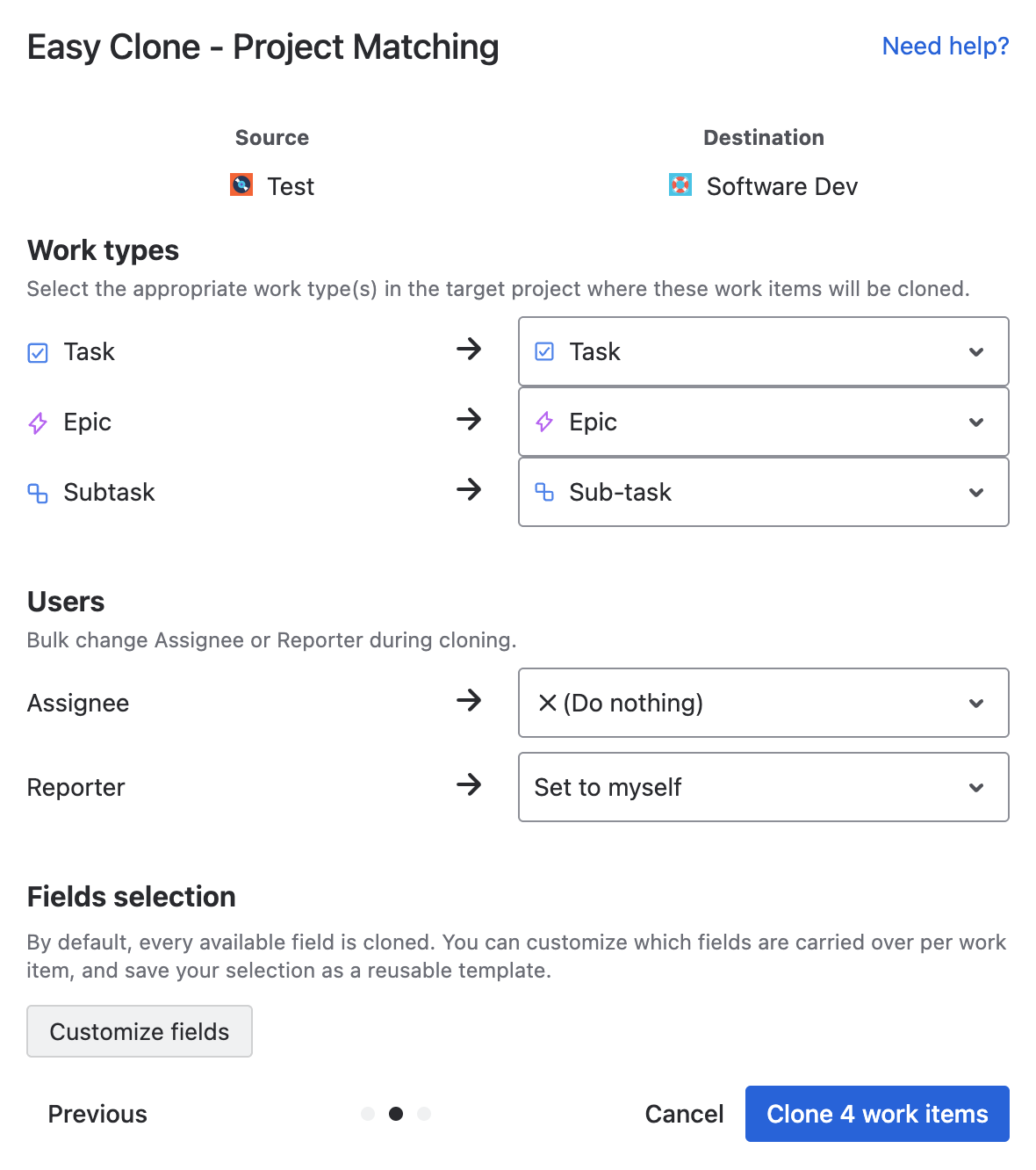 The clone dialog with a different target project selected, the epic’s stories and sub-tasks mapped into it.
Keep this scoped to the epic on purpose. If the real job is moving or duplicating work across projects at scale, that is a broader, transactional task, and the Easy Clone home page covers bulk-cloning Jira issue hierarchies across projects.
Clone the epic, or build a template?
One honest caveat before you wire cloning into your routine. Cloning copies an epic as it stands right now, edits and all. That is perfect when the plan still changes between rounds, or when you reuse it now and then. If instead the structure is fixed and you spin it up constantly, and you want one definition that everyone starts from, that is a template job rather than a cloning job, and a templating tool will serve you better than copying last quarter’s epic forever. Clone when the source is a living plan, template when it is a standard. Many teams do both: keep a clean reference epic, and clone from it.
FAQ: cloning a Jira epic and its children
Will one clone bring the epic’s stories and sub-tasks together?
With a deep clone, yes. A single run copies the epic, the stories and tasks under it, and the sub-tasks under those, in one pass. Native Jira clone will not, it reaches only the first level below the epic, which is why the sub-tasks arrive missing unless you copy the full hierarchy.
Does cloning an epic keep its story points, dates, and epic colour?
Yes, those are field values and they copy with the issues, and the epic’s points roll-up recalculates from the copied children. Treat dates and sprint as things to reset, though, since a copy made for a new round should carry its own calendar rather than the original’s.
Can I rename the cloned epic and all its children at once?
Yes. Use find-and-replace during the clone to swap a string, a client name or a quarter, across the epic and every child as the copy is created, so the new tree lands already labelled for the round you are running.
Can I clone an epic into another project?
Yes. Choose the target project during the clone, and the epic, its stories, and their sub-tasks are mapped into that project’s issue types and fields, with each child re-parented correctly instead of dropped.
Can I clone an epic without copying every child issue?
Yes. Open the epic’s tree before you run the clone and clear the stories or sub-tasks you do not need, so the copy begins as the subset you want rather than the full tree minus a later cleanup.
Should I clone the epic or build a template?
Clone when the plan still evolves or you reuse it occasionally, since a clone captures the epic exactly as it is today. Build a maintained template when the structure is fixed and you launch it constantly and want a single source everyone starts from.
Run your plan again, not your data entry
The fastest way to judge this is on an epic you already reuse. Open the demo and copy one of your multi-level epics, rename it for the next round in the same pass, and check that every story and sub-task arrived. When it holds up, install Easy Clone, free for your first 10 users, with paid tiers starting at $0.40 per user a month and dropping from there. The plan you trust is worth running again without rebuilding it by hand.
Found this helpful? Share it.
Ready to clone smarter?
Install Easy Clone from the Atlassian Marketplace. Free trial, no credit card.